Start streaming for free. No card needed. No app to install.
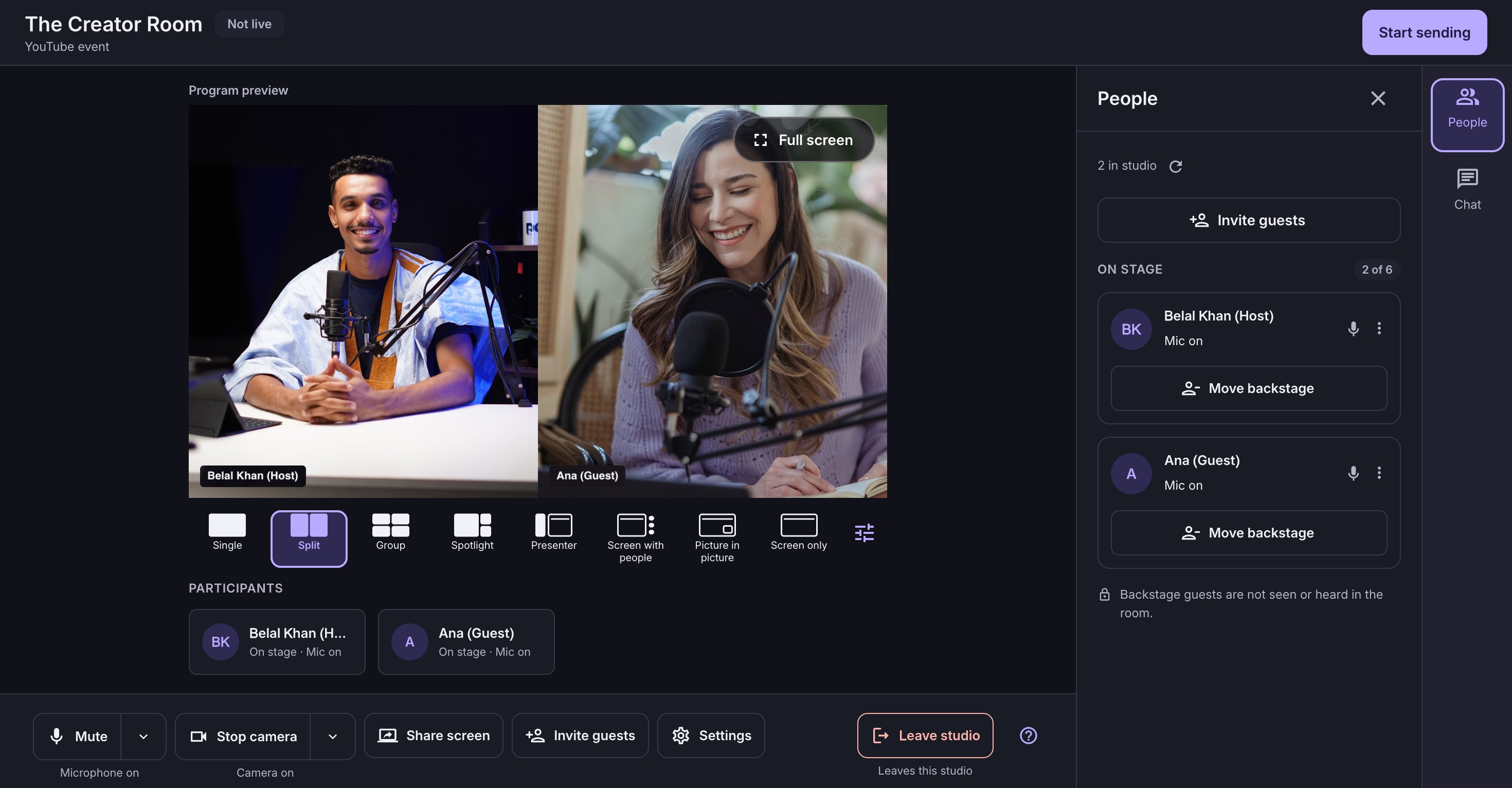
Product preview · Real app interface with demo participant imagery
One link for your guestsNo guest sign-up or download.
No OBS, no installSkip scenes, sources and settings.
1080p. No watermark.Included on every plan.
From first idea to first hello
Go live on YouTube with guests in three steps.
No OBS setup, no downloads.
1
Create your studio
Sign in with Google. Name your show. Choose a live stream or a recording.
2
Check in, together
Check your camera and microphone. Share a link so guests can join backstage.
3
Shape the stage
Choose a layout and add your guests. Go live on YouTube when you are ready.
You set the pace
A warm welcome. A stage you control.
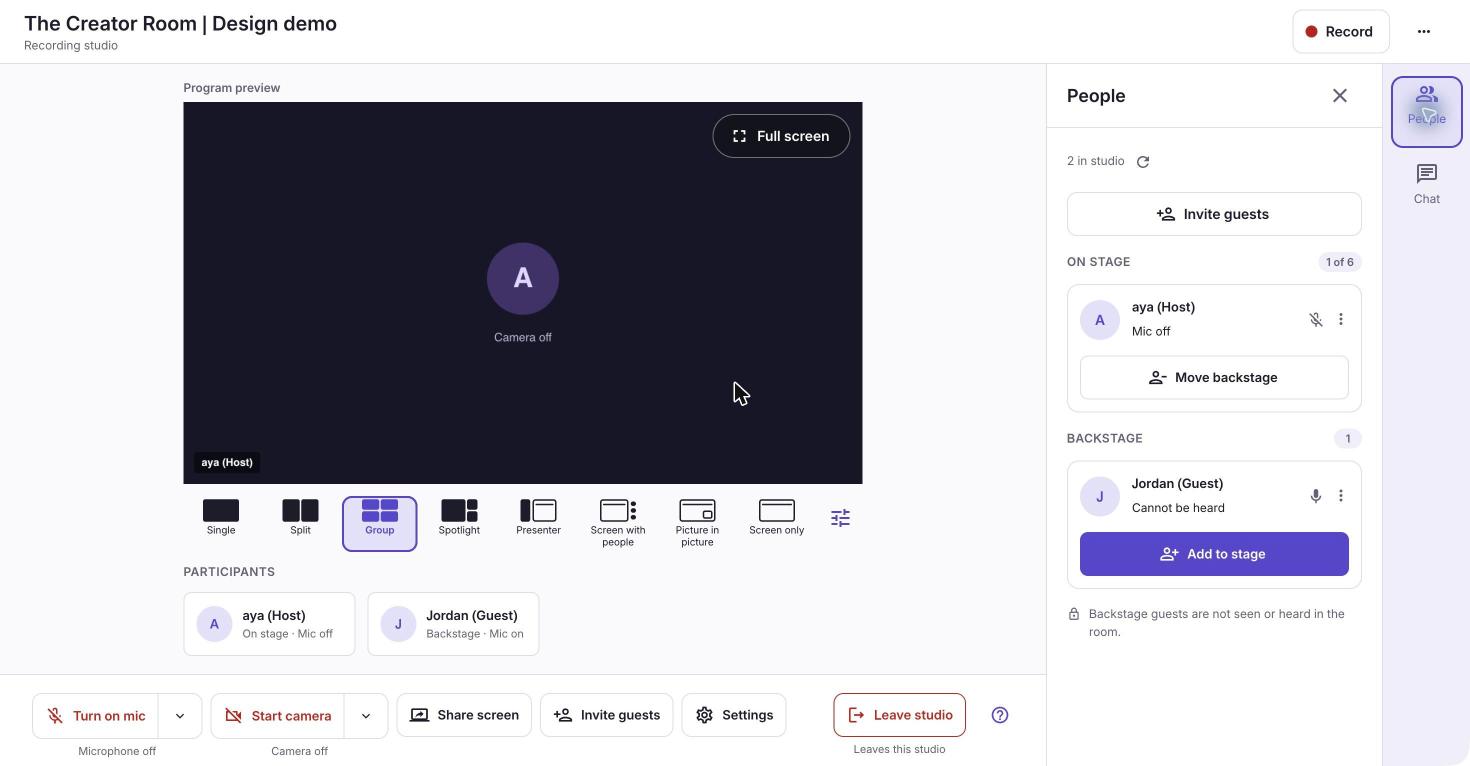
Guests arrive backstage. Bring them onto the stage when you are ready. Their microphone is not heard in the room while backstage.
People first. Controls within reach.
A closer look at the actual guest controls
Built for real conversations
A free live streaming studio for every kind of show.
Whatever you host, guests join with one link and you stay in control.
Podcasters
Record or stream a podcast with remote guests. Skip the long OBS setup and the downloads.
Creators
Go live on YouTube from your browser with guests, layouts and no watermark.
Educators and communities
Run a class, a Q&A or a community call. Guests join with one link.
Teams
Host a town hall or a product demo and keep the whole conversation in one place.
Switching from another tool?
A free StreamYard alternative that stays simple.
StreamEasyStudio is a browser studio for YouTube and recordings. Here is how the basics compare.
Feature
StreamEasyStudio
Other browser studios
OBS with VDO.Ninja
Runs in the browser
✓Yes, nothing to install
✓Yes
✕No: No, you install OBS
Guests join with one link
✓Yes, no account
✓Yes
✓Yes, through a link
Free plan without watermark
✓Yes, free for now
~Partly: StreamYard Free puts its logo in your stream
✓Yes, free
Setup to go live on YouTube
✓Sign in and go
✓Sign in and go
~Partly: Scenes, sources and settings
OBS gives you more control. We give you less to set up. Based on public plan pages checked in November 2026. Plans change, so check each provider before you decide.
What creators say
Streaming that stays out of your way.
“
StreamEasyStudio is an affordable and easy to use platform for creators. It makes live streaming simple and hassle free, without complicated setups. A great tool for anyone looking to start streaming effortlessly.
ANAkshay NandawanaDeveloper Advocate
“
I really liked how simple StreamEasyStudio is. You don't need to spend hours figuring things out. Just set it up and start streaming. It's affordable, easy to use, and perfect for creators who want to focus on their content instead of technical stuff.
ASAzim Siddiquie
“
Setting up an online podcast with OBS can be complicated and take hours to get everything right. StreamEasyStudio makes the whole process so much easier. I can focus on the conversation instead of worrying about the technical setup. Simple and really useful for podcasters.
PGPrakhar Gandhi
1 of 3
Pricing
A free live streaming studio, with room to grow.
Start free. Add room when you need it.
75% off the regular price on paid plans
Free for Now
For your next idea.
No card needed
$0 for now
No subscription.
6 people in the room
3 people on stage
1080p. No watermark.
Direct guest connections
Optional: your own Cloudflare
Day Pass
For an occasional bigger show.
Regular price $2075% OFF
$5 one-time
Pay once. No renewal.
10 people in the room
6 people on stage
1080p. No watermark.
3 managed hours per pass
24 hours from first connection
Studio Plus
For conversations that keep coming.
Regular price $4475% OFF
$11 / month
Billed monthly. Cancel any time.
10 people in the room
6 people on stage
1080p. No watermark.
20 managed hours per month
Managed connections. No setup.
75% off the regular price. Prices include applicable taxes. Everyone in the room includes the host.
Our free plan is available for now. Its pricing and features may change in the future.
Questions
Questions about free live streaming.
Is StreamEasyStudio a free StreamYard alternative?
Yes, you can start free. Free for Now gives you up to six people in the room, three on stage, 1080p and no watermark. It runs in your browser, so there is nothing to install.
Can I stream to YouTube for free?
Yes. Free for Now lets you go live on YouTube from your browser, with no watermark and no card.
How is this different from StreamYard Free?
StreamYard Free puts its logo in your stream and shows 6 people on screen. Free for Now has no watermark, with 3 people on stage and 6 in the room.
Can I live stream to YouTube without OBS?
Yes. You go live from your browser. There are no scenes or sources to set up.
Is this an alternative to VDO.Ninja?
It can be. VDO.Ninja usually runs with OBS on your computer. StreamEasyStudio runs in your browser, with guests, layouts and YouTube in one place.
Do guests need an account?
No. They open your link, enter their name and check their devices.
Can I share my screen?
Yes. Share your screen with your guests during the show.
Can I record and stream at the same time?
Not in one studio. You choose a live stream or a recording when you create the studio.
Which browsers work?
All major browsers work. Keep yours up to date for the best experience.
Does entering the studio start a broadcast?
No. You prepare in the studio first, then choose when to go live.
How are managed hours counted?
Time connected through our managed service counts, live or not. One meeting at a time.
Will Free for Now work on every network?
Some strict networks block direct calls. See connection options before your show.
Good conversations deserve a stage.
Bring your idea. Invite your people. Make it yours.